
Workforce Analytics Without Screenshots or Keystroke Logging
TIMO360 turns attendance and presence signals into a clear picture of how your team works: who is active, idle or offline right now, when activity peaks, and how each employee's day splits into working, idle, break and meeting time. It is built from presence signals alone, so there is nothing on screen to record, store or secure.
- No screenshots or keystroke logging
- Windows, macOS & Linux
- Per-employee pricing
Why Workforce Analytics Is Hard to Get Right
The usual options fit most teams badly. Here is what gets in the way.
Hours live in spreadsheets
Attendance and hours collected by hand arrive late, differ from team to team and are hard to compare.
No live view of the team
Managers learn who is online by asking, which does not scale across locations and time zones.
Totals hide the pattern
A daily total says little about when a team is most engaged or when quiet periods cluster.
Analytics that feel like surveillance
Screen capture and keystroke logs produce data, but they cost you your team's trust.
Workforce Analytics on Presence Signals, Not Surveillance
Live team status
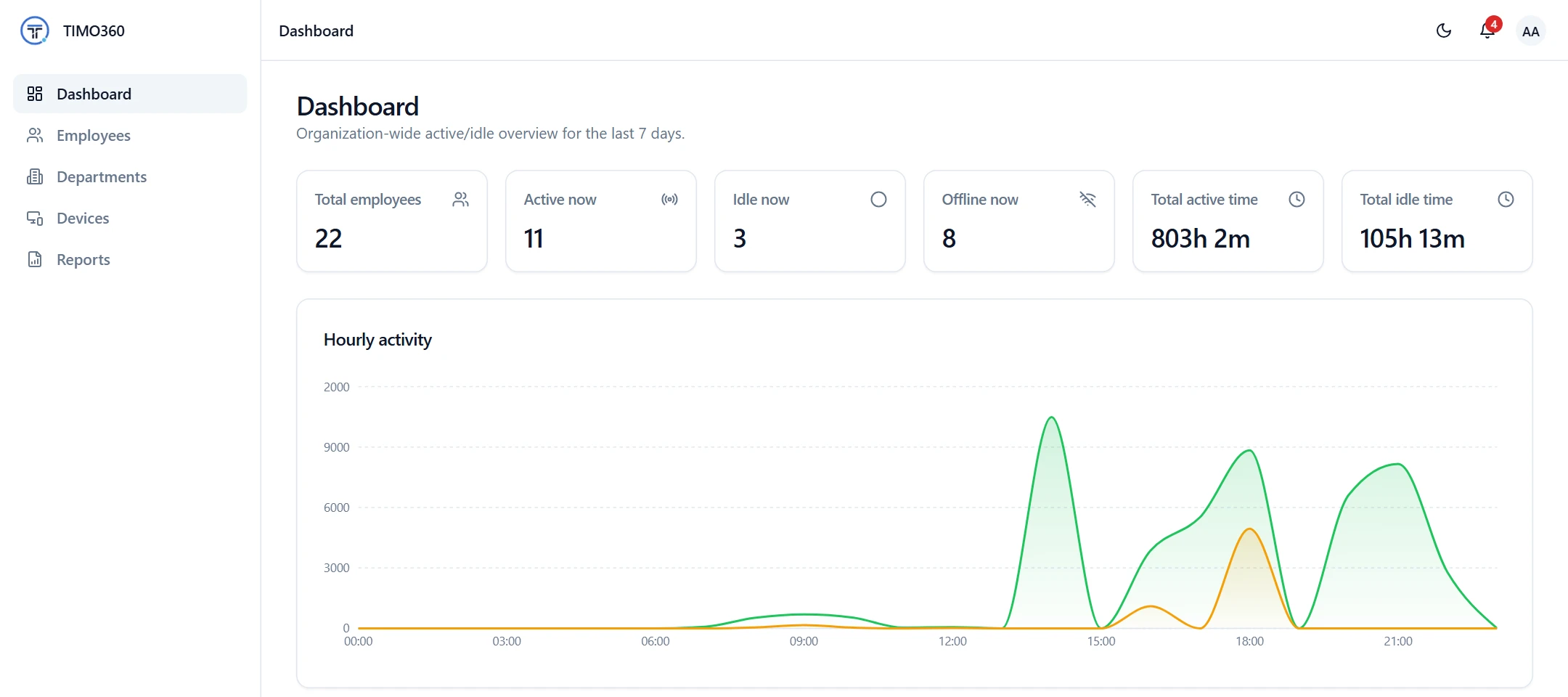
The dashboard shows total employees and how many are active, idle and offline right now, with an employee status table that refreshes automatically every 30 seconds.
Real-time monitoringHourly activity chart
An Active vs Idle chart by hour of day, across the last 7 days, shows when your team is most engaged and when it goes quiet.
Activity level trackingA page for every employee
Each employee's page shows tracked, active, idle and break time, days worked and a timeline of punches, breaks and the application in use.
Employee and team managementDaily, weekly and monthly reports
Generate an employee or organisation report for today, the last 7 days or the last 30 days, filter by department, and export CSV, Excel or PDF.
Reports and exportsAnalytics for each team lead
Managers see their direct reports and the departments they head, so each lead works with their own team's numbers.
Roles and access controlShared with employees
Employees see their own numbers in My Report, including their top applications, so analytics are open to the people they describe.
What employees can seeHow It Works
From sign-up to your first report in three steps.
Install the agent
Employees install the desktop agent and enter the single-use enrollment code from their invite email.
Employees punch in
Tracking runs only while an employee is punched in. The agent reports active and idle presence, breaks and meetings.
Review the picture
Managers and admins open the dashboard, an employee's page or a report to see where the time went.
What It Does Not Do
Worth knowing before you decide.
- No productivity scores, rankings or benchmarks. TIMO360 reports time and presence, not a performance rating.
- No productive or unproductive classification of applications.
- No project, client or billable-time analytics, and no capacity planning or forecasting.
Exactly What Is Collected, and What Never Is
Collected
- The active application name and process ID
- Window title text, as text only and never page content
- A yes/no keyboard and mouse activity signal
- Punch in/out, break and meeting times recorded in the agent
- Device details such as OS version and agent heartbeats
Never collected
- Screenshots or screen recording
- Keystroke logging — never what you type
- Webcam or microphone capture
- Passwords, clipboard or form contents
- Full page URLs or query strings
- Message or document contents
Your organization remains responsible for telling employees how they are tracked and for complying with local law. Read the full privacy policy.
Workforce Analytics Questions
More in the full FAQ.
What does TIMO360 report on?
Attendance (punch in and out), active, idle and offline status, break and meeting time, and the active application and window title text. Reports show Break, Working, Idle and Meeting time for each employee and date, and an employee report adds tracked time, active time, idle time, idle sessions and an activity timeline.
Does TIMO360 give employees productivity scores?
No. It reports how time was spent: active, idle, break and meeting time. It does not score employees or classify applications as productive or unproductive.
How often does the dashboard update?
The employee status table refreshes automatically every 30 seconds, and the desktop agent reports while the employee is punched in.
Can managers see only their own team?
Yes. Managers see their direct reports and the departments they head, and employees see only their own My Report.
Can we export the analytics?
Yes. Daily, weekly and monthly reports export as CSV, Excel or PDF, and can be filtered by department.
Ready for Attendance & Presence Tracking That Respects Your Team?
Set up your organization, install the agent, and start seeing attendance and presence data in minutes — without a single keystroke or screenshot recorded.