
Work From Home Monitoring for Remote and Hybrid Teams
When your team does not share an office, attendance and activity have to come from the work itself. TIMO360 runs a small agent on each employee's own Windows, macOS or Linux computer, so punch times, active and idle time, breaks and meetings are recorded the same way at home, in the office or on the road, without screenshots, webcam or keystroke logging.
- No screenshots or keystroke logging
- Windows, macOS & Linux
- Per-employee pricing
Why Work From Home Monitoring Is Hard to Get Right
The usual options fit most teams badly. Here is what gets in the way.
Attendance rests on trust alone
Without a shared office there is no record of when the working day started and ended.
Many locations and time zones
Teams spread across places need days and reports to line up with one working timezone.
Home connections drop
A tracker that loses data every time the internet blips produces gaps nobody can explain.
Remote monitoring feels invasive
Webcam checks and screen capture in someone's home cross a line most employees will not accept.
Work From Home Monitoring on Presence Signals, Not Surveillance
Attendance from each person's computer
Punch in and out and breaks are recorded by the agent on the employee's own device, so attendance works the same at home, in the office or on the road.
Attendance trackingLive active, idle and offline status
See who is active, idle or offline right now, with the employee status table refreshing every 30 seconds.
Real-time monitoringDevice status and silent-device alerts
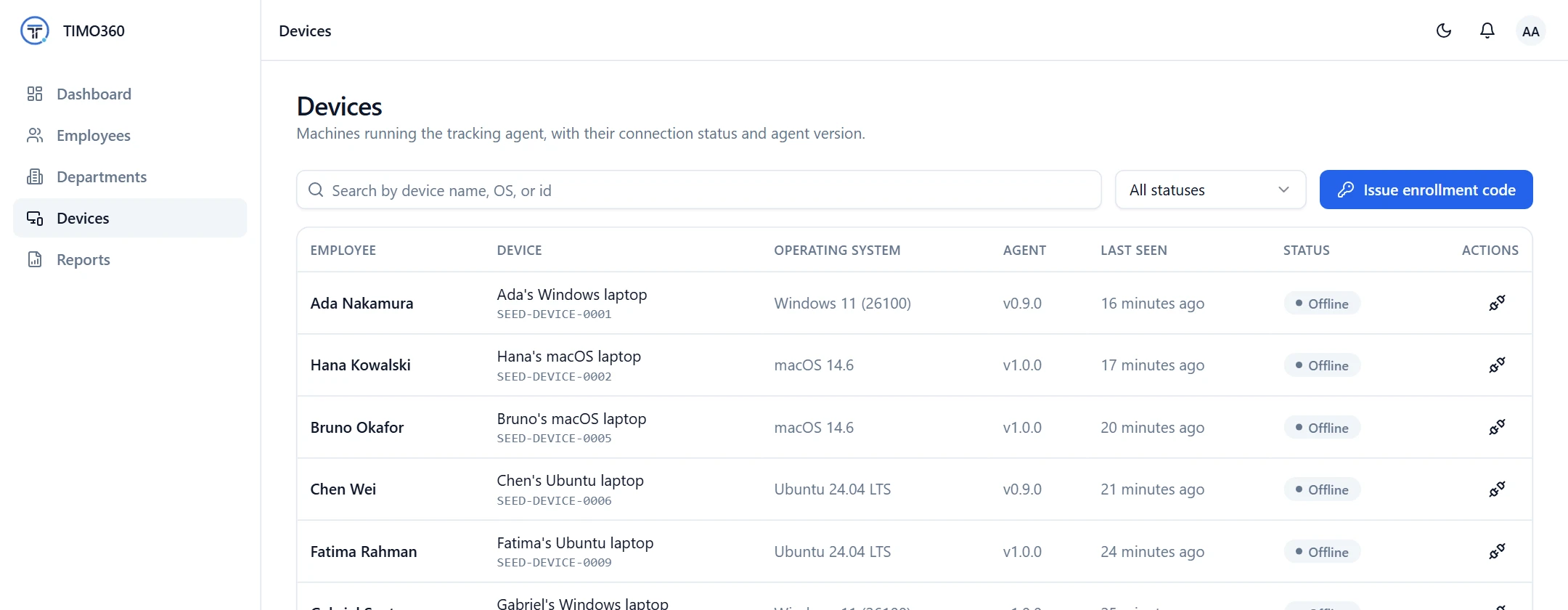
Each enrolled device shows as online, idle, offline or disconnected, and administrators are notified if one stays silent for over 2 hours while its employee is punched in.
Device managementKeeps working through outages
If a computer loses its connection, the agent keeps a queue of events and syncs them when it can, so a dropped connection does not leave a hole in the day.
Automated time trackingOne timezone for the working day
Your organization's timezone decides where each day starts and ends, so punch-outs, breaks and reports line up for people in different places.
Data retention and timezoneSimple remote rollout
Add an employee and they get an email with an enrollment code and a link to the agent. They install it, enter the code and are tracked from their first punch in.
Employee and team managementHow It Works
From sign-up to your first report in three steps.
Invite your team
Add employees and each one receives an invite email with a single-use enrollment code.
They install the agent
Employees install the agent for Windows, macOS or Linux on their own computer and enter the code.
Follow the day remotely
Watch status, timelines and reports from the dashboard, and respond to device alerts.
What It Does Not Do
Worth knowing before you decide.
- No GPS, location or geofencing, and no webcam or microphone access.
- No screenshots or screen recording, so there is no view of what is on a home screen.
- Tracking only while an employee is punched in and not on a break.
- A desktop agent only: there is no mobile app.
Exactly What Is Collected, and What Never Is
Collected
- The active application name and process ID
- Window title text, as text only and never page content
- A yes/no keyboard and mouse activity signal
- Punch in/out, break and meeting times recorded in the agent
- Device details such as OS version and agent heartbeats
Never collected
- Screenshots or screen recording
- Keystroke logging — never what you type
- Webcam or microphone capture
- Passwords, clipboard or form contents
- Full page URLs or query strings
- Message or document contents
Your organization remains responsible for telling employees how they are tracked and for complying with local law. Read the full privacy policy.
Work From Home Monitoring Questions
More in the full FAQ.
Does TIMO360 track employees when they are not working?
No. Nothing is tracked before an employee punches in, after they punch out, or during a break.
Does it use the webcam, microphone or location?
No. There is no webcam, microphone, screenshot, screen-recording or GPS or location-tracking capability.
What happens if an employee's internet drops?
The agent keeps a queue of events and syncs them when the connection returns. A device that stops responding is shown as offline, and administrators are notified if it stays silent for over 2 hours while its employee is punched in.
How do remote employees get set up?
They receive an invite email with a single-use enrollment code, install the desktop agent and enter the code. Codes expire after 1 day, and administrators can resend an invite.
Can we use it for hybrid teams?
Yes. The agent runs on each employee's own computer, so attendance and activity are recorded the same way in the office and at home.
Ready for Attendance & Presence Tracking That Respects Your Team?
Set up your organization, install the agent, and start seeing attendance and presence data in minutes — without a single keystroke or screenshot recorded.