
Automatic Employee Time Tracker
Accurate working time without timers or manual timesheets. A lightweight desktop agent records when your team is active, idle or on a break, tracking only while employees are punched in, so every hour is captured the same way, every day.
No more forgotten timers, no more guesswork about idle time. Just consistent time data you can trust, with no keystroke content and no screenshots.
Windows · macOS · Linux
Automatic Time Tracking for Maximum Control
Once an employee punches in, the desktop agent takes care of the rest. It reports keyboard and mouse presence, syncs it to the platform and stops when they punch out or go on a break, so there are no timers to remember and no entries to correct.
Automated tracking is a great fit for remote teams and any organization that needs consistent, reliable time records.
You're not punched in — nothing is being tracked. Punch in to start your day.
Nothing is tracked before you punch in, after you punch out, or during a break.
Breaks and Meetings Without Manual Edits
Employees start a break from the agent with an optional reason, and tracking pauses until they end it. There is no cap on break time, and breaks are recorded separately from idle time.
Meetings are handled just as fairly: employees mark a meeting from the agent and that time counts as active, even without keyboard or mouse input. No application or window details are recorded during meetings.
Reason (optional)
e.g. Lunch, Doctor appointment
Description (optional)
e.g. Sprint planning, Client call
Time in a meeting is counted as active, but no application or window detail is recorded while it runs.
Lightweight Background Tracking, Fully Transparent
The agent runs in the background and can start automatically at login, so employees can focus on their work instead of the tracker. It syncs about every 20 seconds, and the connection status is always visible in the agent.
Transparency is built in. The agent tells employees exactly what is recorded, shows a Shift summary after they punch out, and we publish the full list of what is and is never collected. Background does not mean hidden: this is an activity and time system, not surveillance.
Why choose automated time tracking software?
Consistent records
With automated tracking, the agent handles everything once an employee punches in. Time is collected the same way throughout the working day, for every employee.
How a day is recorded
Accurate data without manual errors
Manual timesheets lead to inconsistencies, forgotten entries and inflated hours. Automated tracking removes human error by capturing activity as it happens.
Clear daily records
Every day lists punch in, punch out, active, idle and break time, so there is a dependable record for each employee.
Punch times, day by day
Reports ready to share
Generate daily, weekly and monthly reports with working, idle, break and meeting time, and export them as CSV, Excel or PDF for payroll or billing.
Give Employees Control with Punch In and Out
Automation does not mean losing autonomy. Employees decide when their day starts and ends, take breaks and mark meetings from the agent, and can always see their own totals.
One punch-in per day
Employees punch in when they start and punch out when they finish. Punching out marks the day's shift complete, so each day has one clear record.
Breaks on their terms
Start and end a break whenever you need one, with an optional reason. Tracking pauses automatically, and the totals appear in the day's report.
Trust-based environments
Employees see a Shift summary after punching out and have their own My Report page, which builds confidence and reduces disputes about hours.
A Lightweight Agent Built for Every Device
Roll out tracking across your organization with an agent that is simple to install, easy to manage and designed to respect your team's privacy.
Runs in the background
Tracks quietly while an employee is punched in, and can start automatically at login.
Admin-controlled setup
Administrators issue single-use enrollment codes and can revoke any device instantly.
Windows, macOS and Linux
One agent for every platform your team uses: Windows 10 or later, macOS 12 or later and Linux.
Automatic updates
The agent checks for updates when it starts and installs them automatically, keeping the fleet current.
Private by design
The agent detects that input happened, never what was typed. It does not capture screenshots, screen recordings, audio or webcam.
What Automated Tracking Will Never Do
Trust is the foundation of good time tracking. These are commitments built into the product, not settings you have to remember to switch on.
Read the privacy pageIt never records what you type.
The agent only knows that typing or mouse activity happened, as a simple yes or no signal.
It never takes screenshots.
No screen captures, screen recordings, audio or webcam. Meeting time records no application detail at all.
It never works while you are off the clock.
Nothing is tracked before you punch in, after you punch out, or during a break.
Shift summary
Download image
Desktop Agent and Web Dashboard
Track work time on Windows, macOS and Linux with a lightweight agent that handles punch in and out, breaks and meetings, and shows a Shift summary at the end of the day.
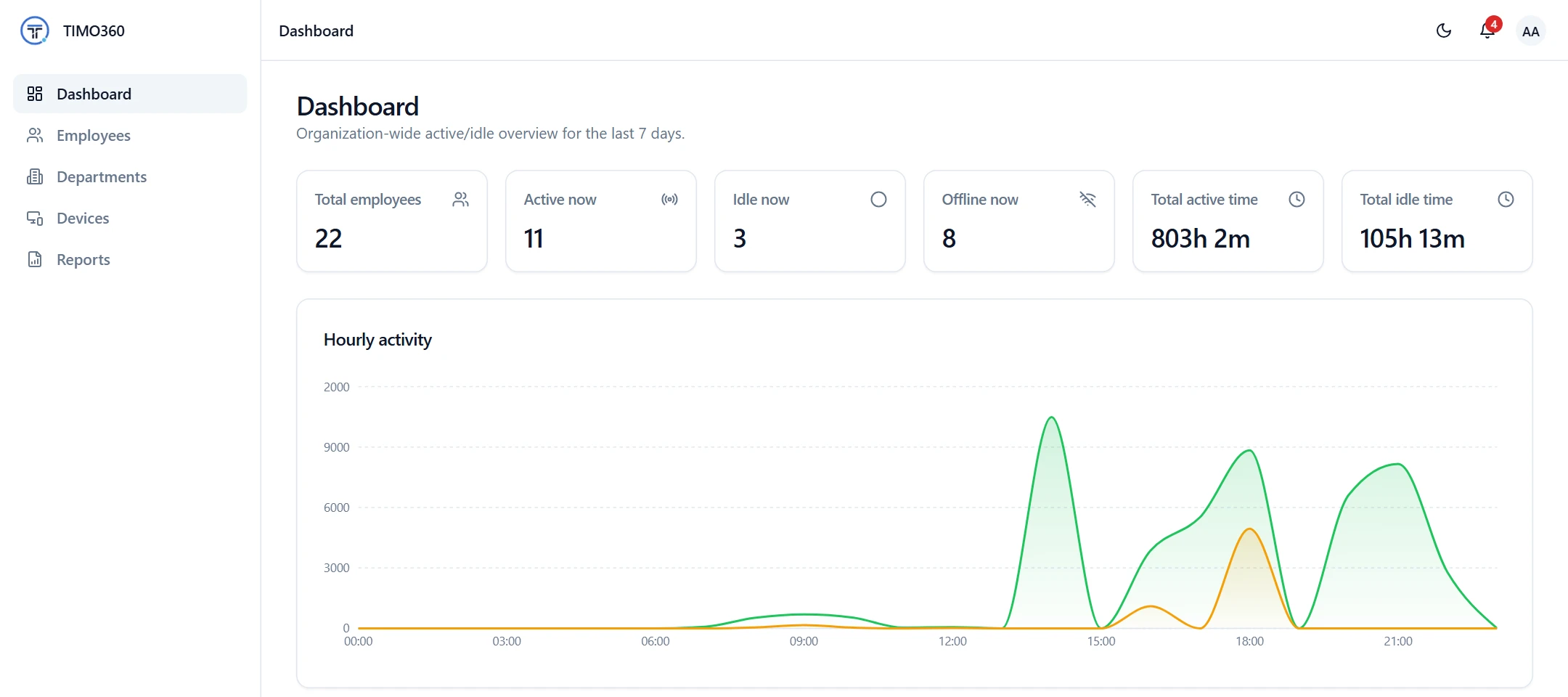
Administrators see the dashboard, employee status, hourly activity and reports from any browser, with no software to install.
Employees have their own My Report page with their activity summary, timeline and daily report, so they always know how their time was recorded.
Advanced Features of Automated Time Tracking
Beyond automated time collection, the platform delivers the visibility and reporting you need to run your team with confidence.
See who is active, idle or offline on the dashboard, which refreshes automatically every 30 seconds.
An hourly chart of active and idle time shows when your team is most engaged, based on input presence only.
Hourly activity
Active and idle time by hour of day
Punch in and out records, break totals and a day-by-day report for every employee.
Punch times, day by day
Daily, weekly and monthly reports on working, idle, break and meeting time, exported as CSV, Excel or PDF.
FAQ
It is a tool that records working time without employees starting and stopping timers. The desktop agent runs in the background while an employee is punched in and records whether they are active, idle or on a break, so time records are built automatically.
Transform Time Tracking with TIMO360 Today
Windows · macOS · Linux